
ApeElvis
3 discussion posts
Hi everyone. I’m a home user running DisplayFusion Pro Trial 11.1.1 on Windows 11, and I’m trying to solve a mouse‑movement issue with my four‑monitor setup. I’ve attached a screenshot of my Monitor Configuration so you can see the layout.
Here’s how my monitors are arranged physically:
* Monitor 2 is my primary monitor in the center, 2560 x 1440, horizontal
* Monitor 4 is above Monitor 2, 1920 x 1080, horizontal
* Monitors 1 and 3 are on the right and left sides of Monitor 2, both 1080 x 1920, vertical
Because Monitor 4 is narrower than Monitor 2, there are gaps between Monitor 4 and Monitors 1 and 3 in the Monitor Configuration window. This prevents the mouse from moving directly between 4 and 1, and between 4 and 3. To get from 4 to either side monitor, I have to drop down to Monitor 2 first, then move over, then back up. I’m trying to avoid that.
Here’s what I’ve tried so far:
* Enabling mouse wrapping. This caused unexpected behavior. Moving from 4 to 3 made the cursor jump to the outside edge of Monitor 1, and moving from 4 to 1 made it jump to the outside edge of Monitor 3.
* Disabling sticky edges
* Trying to drag Monitor 4 to touch Monitors 1 and 3. This fixes one side at a time, but the gap remains on the other side.
* Looking for the old Monitor Edge Settings feature
* Trying to create triggers
What I’m trying to accomplish is simple. I want to move the mouse directly from Monitor 4 to Monitors 1 and 3 without having to pass through Monitor 2. I’d like the mouse to move fluidly between all monitors as if they were one large continuous display.
I’m using the trial version right now and considering buying the single user license while it’s on sale, but I need to know whether DisplayFusion can solve this particular issue and how to configure it if it can.
If there’s a solution, I’d appreciate a clear explanation of how to set it up.
Thanks in advance.
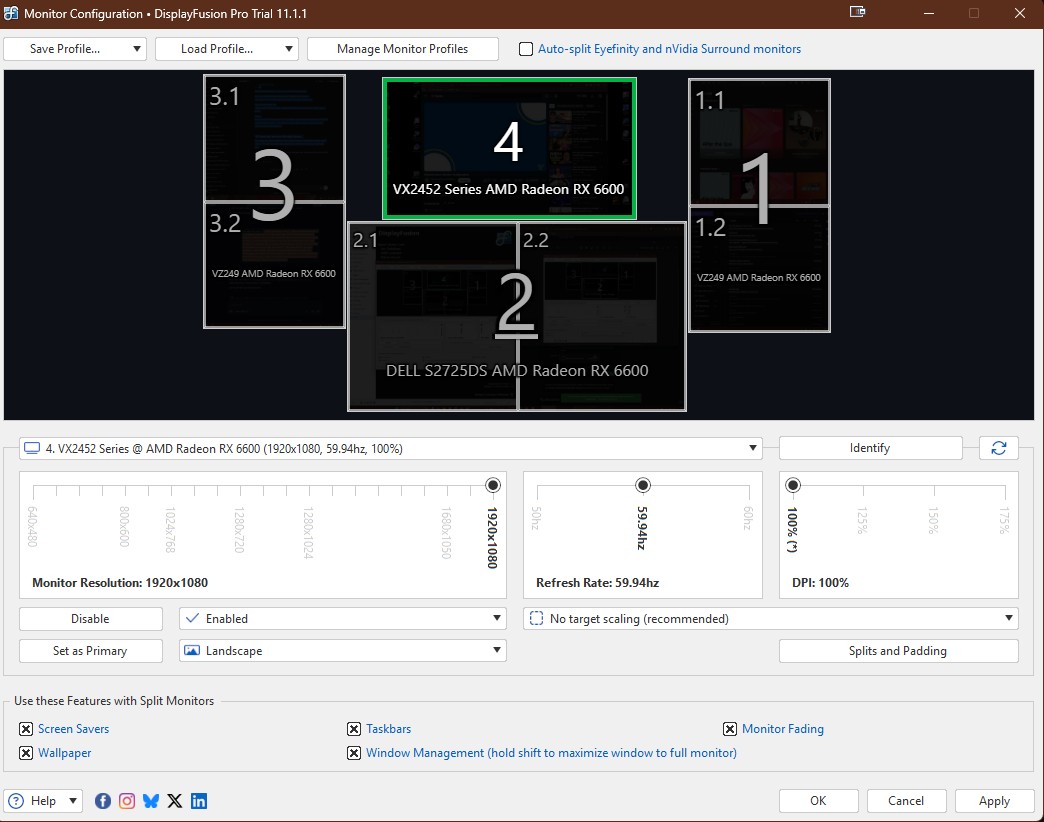
Top Center.jpg
That's not something we currently support, but it is on our feature request list so I've added your vote to it. We'll let you know if it's something we're able to fix in the future.
Thanks!
ApeElvis
3 discussion posts
I did quite a bit of searching through older discussions and noticed this is a common request. I also noticed that the same response was given to discussions in the years past. Is this something you are really working on?
ApeElvis
3 discussion posts
Okay, let me know when you do and I will purchase the product. Until then, I'll have to keep looking for another solution.













