Processing Ajax...

Title

Message

Confirm

Confirm

Confirm

Confirm

Are you sure you want to delete this item?

Confirm

Are you sure you want to delete this item?

Confirm

Are you sure?
If you are experiencing any issues with your desktop wallpaper or taskbar buttons
please download and install the latest DisplayFusion beta version before contacting support.

User Image
Dajova
15 discussion posts
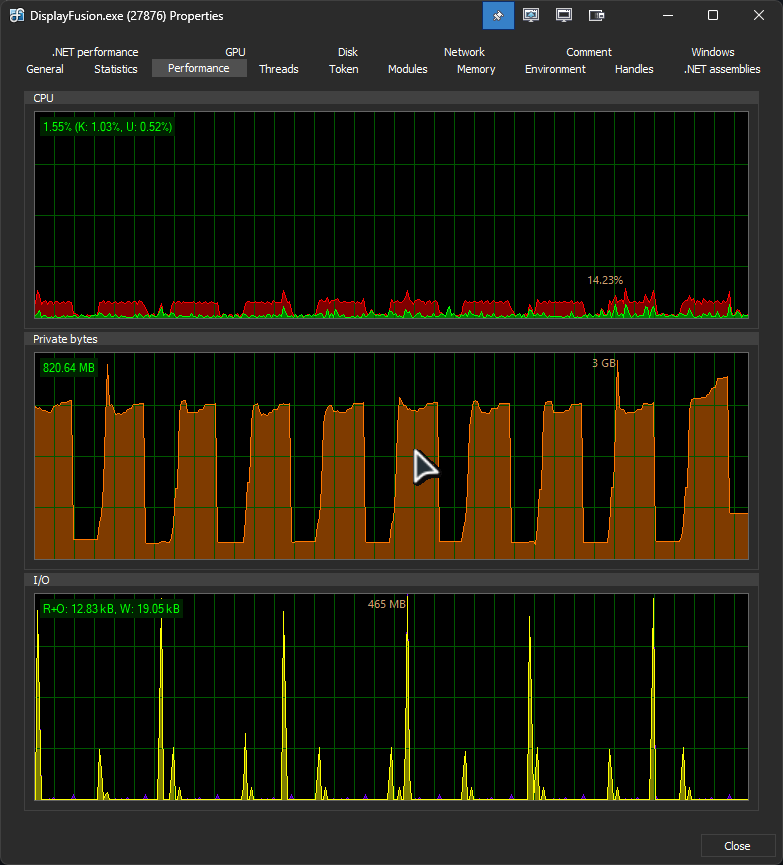
I'm not sure why this is happening, but DF (using v12.0.1) is having some really weird behaviour ever since i did a DDU and installed the latest NVIDIA drivers (591.74):

https://files.catbox.moe/bj2j50.png


It keeps on cycling like this endlessly for no apparent reason... This behaviour goes away if I reinstall the previous 581.xx drivers.

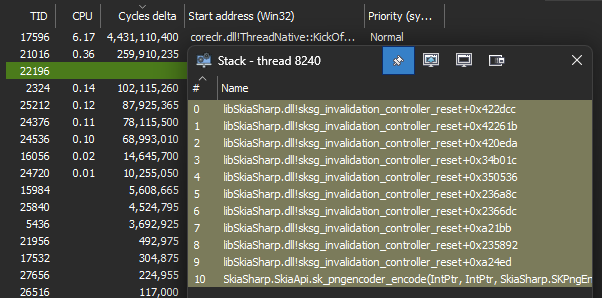
edit: i checked the threads themselves and they seem to call out a invalidation controller reset or something?

https://files.catbox.moe/ziguir.png


edit2: ... or rather, it STILL happens on the older drivers, but they are far less sever or noticeable. Still seem to be driver related.
It seems to stop leaking memory (at least) whenever i play a game, but the I/O and cpu spikes seems to still happening even then.

edit3: Ok, I downgraded DF to 11.1.1 and the issue stopped entierly. I guess i just had'nt been noticing it until now, but v12 seems to really not like my PC.
Jan 14, 2026 (modified Jan 15, 2026)  • #1
Keith Lammers (BFS)'s profile on WallpaperFusion.com
Could you update to 12.0.2 Beta 7 again and send over a debug log for this issue?

  • On the DisplayFusion Settings > Troubleshooting tab, change the Logging drop-down to "L1: Log Minimal" and then click "Clear Log"
  • Reproduce the issue and note the time so we'll know where to check in the log file
  • Click the "Export Info to File" button on the Settings > Troubleshooting tab
  • Reply with the file attached
  • Disable debug logging after sending the log
Jan 15, 2026  • #2
User Image
Dajova
15 discussion posts
Alright, the memory leak stopped happening with the new beta version, but it still does the weird I/O search on a steady basis (about once every min for about 1-2 sec). From what ive been able to skim through the log, it might be related to a screensaver i dont use anymore? Not exactly sure, but that's the only thing i can glean from it...
• Attachment [protected]: DisplayFusionDebugInfo.zip [22,630 bytes]
Jan 15, 2026 (modified Jan 16, 2026)  • #3
Keith Lammers (BFS)'s profile on WallpaperFusion.com
Thanks for the update, I don't see anything unusual in the log. I will pass this up to our developers to take a look at next week to see what they can find out.

Thanks!
Jan 15, 2026  • #4
Keith Lammers (BFS)'s profile on WallpaperFusion.com
It looks like that I/O read every 60 seconds is to read in a Windows UI culture file for some strings we need to read when the system language changes. We're updating it to cache for 60 minutes and using another method to detect if the system language changes. This fix will be in the next beta.

Thanks!
Jan 20, 2026  • #5
User Image
Dajova
15 discussion posts
Alright, sounds good. Still, weird that it isnt preset in v11, so it must've been a recent change. I'll report once the next beta is out!
Jan 20, 2026  • #6
Owen Muhlethaler (BFS)'s profile on WallpaperFusion.com
We've released a new beta with some changes here, can you try it out and let us know if the issue persists?
Jan 29, 2026  • #7
User Image
Dajova
15 discussion posts
Quote:
We've released a new beta with some changes here, can you try it out and let us know if the issue persists?

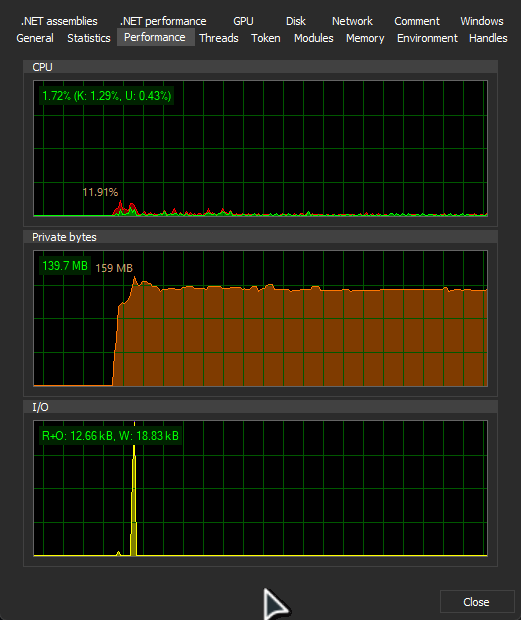
Seems alot more stable (for now), still have to make it run a while to see how it's really preforming, but no more random spikes in the I/O at least! I'll report back if I notice anything else. Thanks! :laugh:
https://files.catbox.moe/rlepko.png
Jan 29, 2026  • #8
Owen Muhlethaler (BFS)'s profile on WallpaperFusion.com
Glad to hear :)
Jan 30, 2026  • #9
Subscribe to this discussion topic using RSS
Was this helpful?  Login to Vote(-)  Login to Vote(-)