Processing Ajax...

Title

Message

Confirm

Confirm

Confirm

Confirm

Are you sure you want to delete this item?

Confirm

Are you sure you want to delete this item?

Confirm

Are you sure?
Save up to 50% on our desktop apps during our big Year End Sale!Save up to 50% on our desktop apps during our big Year End Sale, including DisplayFusion, ClipboardFusion, FileSeek, LogFusion, TrayStatus, and VoiceBot!Save up to 50% on our desktop apps during our big Year End Sale!

User Image
yum45352345
1 discussion post
how do i go about removing everything apart from monitor configurations, monitor profiles and settings from the right click menu in task bar

screenshott of the menu im refering to
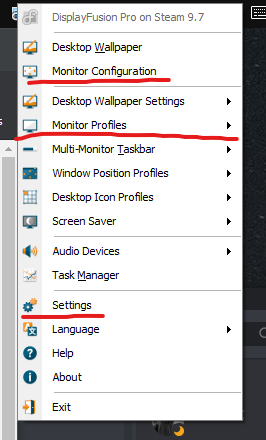
• Attachment: Screenshot 2021-03-16 132042.png [30,284 bytes]
Screenshot 2021-03-16 132042.png
Mar 16, 2021  • #1
Owen Muhlethaler (BFS)'s profile on WallpaperFusion.com
Hello,

If you don't need those features at all, you can create registry settings to remove them, found here: https://www.displayfusion.com/Discussions/View/administrative-settings/?ID=0894066e-5e8b-488d-8ed5-e0264be4b8e6#first, as that will remove them from that context menu.

Hope that helps!
Mar 18, 2021  • #2
Subscribe to this discussion topic using RSS
Was this helpful?  Login to Vote(-)  Login to Vote(-)








