
Steve Sobka
8 discussion posts
I have a quad-monitor setup (1,2,3,4) and here's what I am trying to accomplish:
1. I want to always launch all new Windows (for almost any program) to monitor #2.
2. I then will move the window to the monitor I want to keep it on for the next 20 minutes (let's say monitor 4).
3. After 20 minutes, I minimize the window.
4. When I click on it again in the task bar, it re-opens on monitor 4 for a second and then jumps back to monitor 2).
NOTE: Some programs need to open on my larger monitor so I cannot have a catch-all rule such as "all processes *.*" as some apps have to open on specific monitors.
So I want windows to START on monitor 2, but then stay where I put them until I actually exit the program, not just minimize the window.
If I launch the program again, I want it to start on monitor 2 but if I only mimimize the window on monitor 4, I dont want it jumping back to monitor 2.
(Hope that made sense)
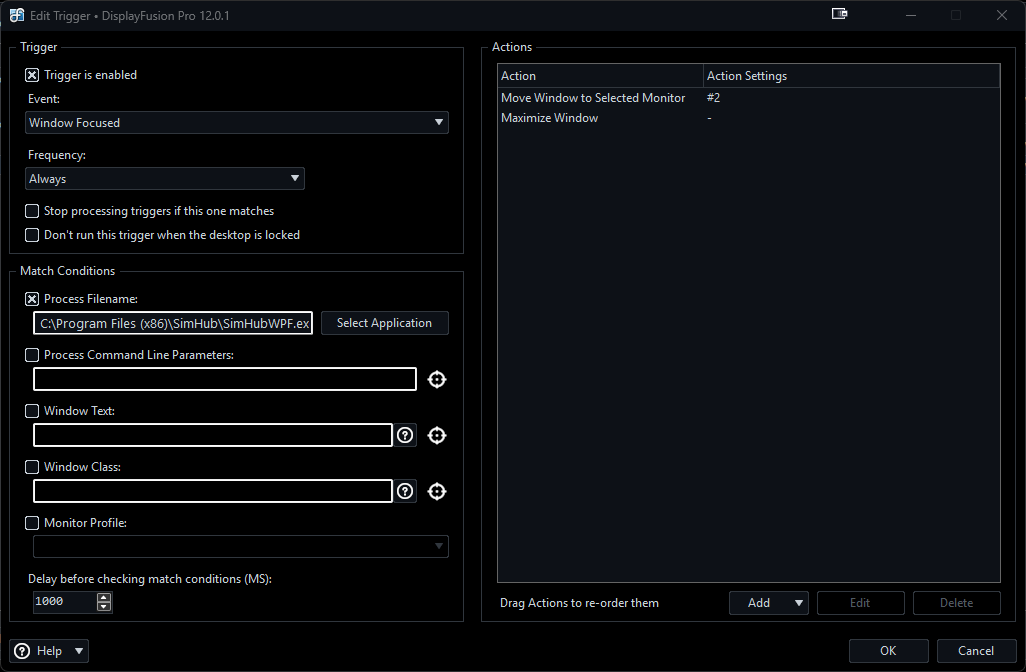
Screenshot of my current trigger is attached.
NOTE: I have tried "frequency = Once per Window" but there's this odd behavior where it does move to monitor two, but as soon as I move it to another monitor, it moves back to monitor 2 once, before I can freely move it to the destination monitor I want.
My monitors are:
Monitor #2 (Single 1920x1080)
Monitor #1 (3 1920x1080 setup via Nvidia Surround as a single 5760x1080 using Monitor Splits as shown in screenshot (1.1, 1.2 and 1.3)
2025-12-22_10-25-49.png
• Attachment [protected]: 2025-12-22_10-38-35.png [165,843 bytes]
Dec 22, 2025 (modified Dec 22, 2025)
•
#1
Have you tried the "Once per Window" frequency setting while using the "Window Created" trigger event? I noticed your trigger is set for "Window Focused" but usually when a new window opens, it doesn't generate a window focused event, which is likely why you were getting the double-move even on "Once per Window."
Glad to hear it, thanks for confirming!












