ScotProf12
24 discussion posts
DF Pro, Win7 x64. 3-monitor setup, arrayed (L to R) 2-1-3. I have hotkeys / title bar buttons for "move to next", "move to previous" and with the release of DF 3.1.8, I have just added "move to monitor 3".
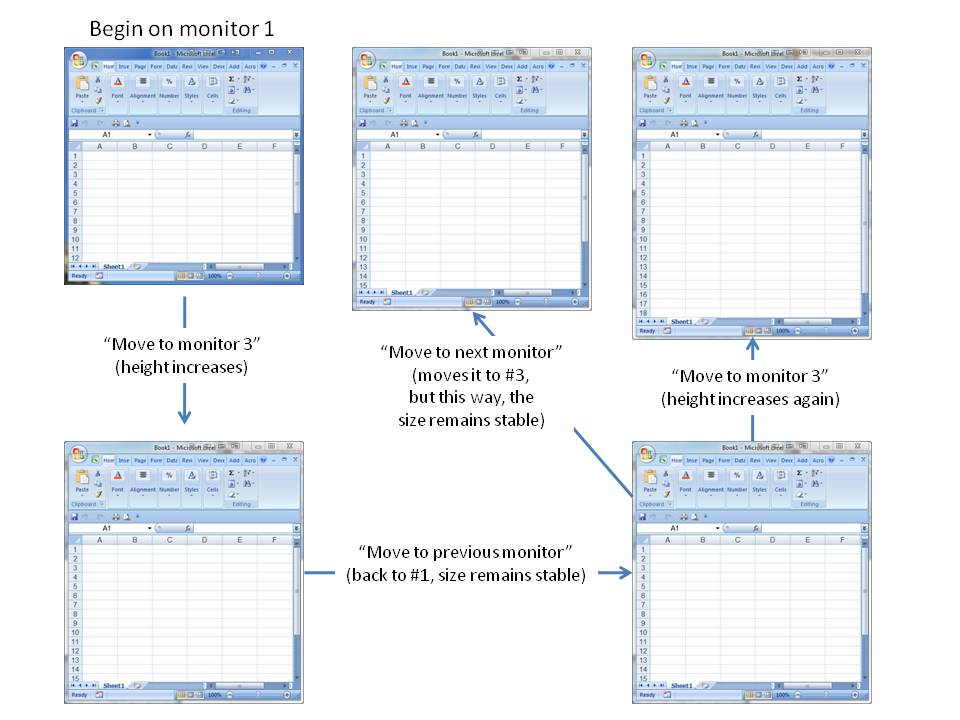
I'll use Excel as an example (and I attach a montage of screenshots). I open an Excel window on #1. I size it to show columns A-F, and rows 1-12.
1. I click the "move to 3", and it moves to the right-hand monitor, but now shows rows 1-15.
2. I click "move to previous". It returns to #1, still shows rows 1-15.
3. I repeat the process - moves to 3, now shows MORE rows (1-18). And so on.
4. However, as shown in the montage, if the window is on #1, and I click "move to next" instead of "move to 3", the window moves over to #3 (because it's the next monitor) but there is NO change in the number of rows.
Monitor #1 is 1920 x 1080; #3 is 1920 x 1200. But, as indicated, there's no issue when I use the "next / previous" buttons. Finally, if I move to the other monitor ("move to monitor 2") the dimensions change (in other words, the problem is not restricted to "move to #3")
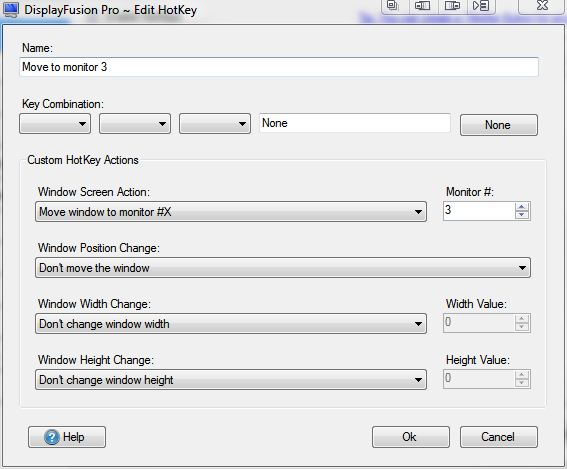
EDIT: should have added: obviously, Window Height Change is set to "Don't" (see attached).
Capture.JPG
Sizes.JPG
I just wanted to let you know that I have found the problem and corrected it. You will find the update in the first public beta coming sometime in the next couple of weeks.
ScotProf12
24 discussion posts
Thanks Jon. Sorry not to have responded to your previous post - I was traveling and had a hard time getting decent wifi access (in Canada !). I'll look out for the public beta. BTW, I am a beta tester (at least, for previous versions) - is there a private beta that I am missing?
Thanks again for fixing this!
ScotProf
ScotProf12
24 discussion posts
OK, I'll look out for it. Cheers.