
Slegnor
52 discussion posts
Hi, I have items pinned to my DF taskbar on monitor 3 which don't launch and stay in the order set in the pinned menu?
You can see the last 3 entries in the screenshot, the 3rd to bottom item is launching last on the toolbar and not where in it should be.
• Attachment [protected]: DisplayFusionDebugInfo.zip [810,657 bytes]
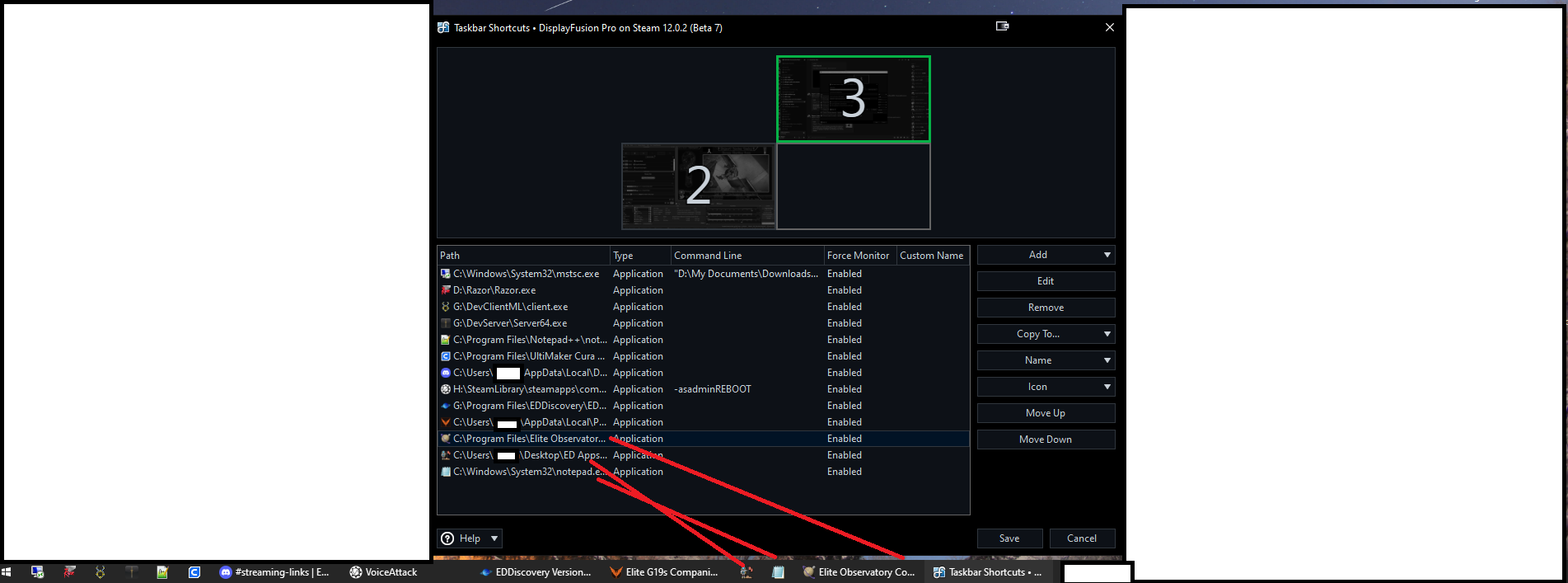
Pinned Items.png
Jan 23, 2026 (modified Jan 23, 2026)
•
#1
Is the icon only incorrect when it's showing a running icon?
Slegnor
52 discussion posts
It seems to be in the correct position when pinned and app is closed, but when i run the app, it jumps to the end position in the taskbar
Does it happen with any other apps, or just that one?
Slegnor
52 discussion posts
Time was 20:19 on 1st Feb 2026
• Attachment [protected]: DisplayFusionDebugInfo.zip [181,803 bytes]
Thanks for sending that over, can you update to our latest beta and grab another log?
Slegnor
52 discussion posts
Retried with Beta 11 - log attached
This time Elite Observatory jumped to the end then jumped back itself a couple of minutes after?
13:25-13:29 hours
• Attachment [protected]: DisplayFusionDebugInfo12.0.2b11.zip [229,917 bytes]
Feb 6, 2026 (modified Feb 6, 2026)
•
#9
If you right-click the DisplayFusion taskbar and go to Multi-Monitor Taskbar > Shortcuts, is it set to "Combine with Taskbar Buttons" or something else?
Slegnor
52 discussion posts
Combine with Taskbar Buttons is highlighted green (which I assume means it's the selected option?)
Ok, thanks for checking that! I've passed this up to our dev team to review the debug log. It may take a few days but we'll get back to you when we have more news.
Thanks!
This info still wasn't enough to go on, unfortunately. We're going to add some more logging and then we'll follow-up again when the next beta is available to grab a new log as well as a screenshot of the taskbar itself.
Thanks!
We've just release 12.1 Beta 4, could you update to it, and send us a new debug log the next time this issue occurs? Please note the time the issue occurred to help us track it down in the log.
Thanks!
Slegnor
52 discussion posts
Beta 12.1 Beta4: 17/07/2026 12:23:35ish is when the Obervatory Core tab jumped position
Beta 12.1 Beta5: 17/07/2026 12:38:45ish is when the Obervatory Core tab jumped position
• Attachment [protected]: DisplayFusionDebugInfo v12.1Beta4.zip [169,194 bytes]
• Attachment [protected]: DisplayFusionDebugInfo v12.1Beta5.zip [167,486 bytes]
Thank you, we'll check the logs out!
I'm sorry for the delay, things are quite busy during the summer but we still have this on the list for testing next week. Thanks!
We've released a new beta with some further changes, could you try it out and let us know if the issue persists?
Thanks!













