
mika10
4 discussion posts
Hi all,
I have a two-monitor setup: one landscape primary, one portrait secondary. DisplayFusion version 12.0.2.
The issue:
When Win11 taskbar alignment is set to Left, everything works fine.
When set to Center, the Start Menu on the portrait secondary monitor opens but renders as a narrow vertical strip showing only the leftmost column of icons — the rest is clipped/missing.
What I've tried:
Toggling "Replace system taskbar" on/off for the secondary monitor (fixes the issue but disables DF taskbar, which I need).
Changing button grouping options.
Adjusting DPI/scaling.
Restarting DF and Explorer.
This only happens when the main taskbar is centered. Left alignment is flawless.
Question:
Is there any hidden setting, registry tweak, or newer beta build that addresses this specific issue? I suspect it's related to DPI scaling or coordinate miscalculation when the taskbar is centered.
Thanks in advance!
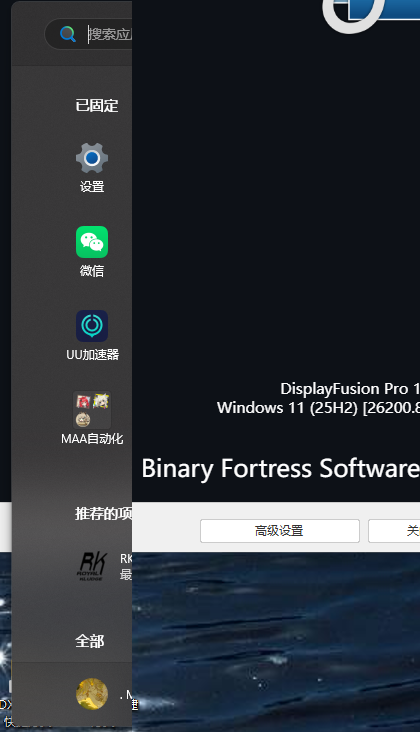
_____20260703154257_175_140.png
mika10
4 discussion posts
Thanks so much for getting back to me. I've attached the file here – please take a look when you have a moment.
Thanks for sending that over. Are you able to send a video of the issue happening?
mika10
4 discussion posts
I tried to upload the video, but it seems that I was not successful. The specific issue is that when I click the "Start" button on the screen or press the "Win" key on the keyboard, the Start menu refreshes to the right side of the screen, then moves to the center, but only appears as a narrow vertical column. I am not sure if this is related to my use of a vertical secondary monitor.
mika10
4 discussion posts
I am not sure whether the video can be uploaded successfully, even though it is only 2.99 MB. I will give it another try.












