ITN007
5 discussion posts
Hello! I really like this software but have run into an annoying problem.
I've made a custom resolution of 1080p@75hz for gaming and it works fine when switching from windows. I've made a monitor profile for 1920x1080 at both 60hz and 75hz and try to switch between them but it does not work. When I change profile, nothing happens. Sometimes the profile for 60hz becomes 75hz randomly.
I own the steam version if that makes a difference and use the latest beta.
What kind of video card do you have? I'll see if I can test this out here :)
Thanks!
ITN007
5 discussion posts
Hi, I have Radeon 7950 and use Windows 10 preview currently.
Is the only difference between the profiles the refresh rate? I've setup a monitor profile for one monitor with different refresh rates, and switching between them seems to work correctly for me.
ITN007
5 discussion posts
Yes, that's the only difference. In fact, I can't even change refresh rate from the monitor profile settings screen, only from windows display settings. It just resets the slider to 60hz if I try. Too bad you can't reproduce but thanks for looking into it.
Interesting! After you've changed it in the Windows settings, if you open the DisplayFusion Monitor Configuration window, does it show up as 75Hz?
ITN007
5 discussion posts
Yeah, DisplayFusion shows the refresh rate correctly, but is unable to change it.
ITN007
5 discussion posts
Maybe it's a Windows 10 problem, or just something weird that just happens in specific cases. Either way, thanks again for looking into it!

VortexDweller
6 discussion posts
Hi,
Was this resolved? I recently upgraded to Windows 10, and I have the same problem. Display fusion reads the frequency correctly, it even reduces the frequency (60hz to 30hz), but it's unable to take it to (increase) the frequency from (30hz to 60hz). I can, however, change the frequency from both within my Radeon 15.12 (Crimson).
How I do encounter this problem is that I have a 4k TV that runs at 30hz, but it can run 1080p @ 60Hz. So When I use it at 4k @ 30hz and when I'm done, and bring it back to 1080p @ 60hz, (The profile settings in display fusion are set to 1080p @ 60Hz), it only brings to 1080p @ 30Hz, and I have to manually change the frequency from within either Windows Dispaly adapter properties, or my Radeon software.
I have the pro version, great software. I think it worked perfectly fine in Windows 7, so I'm guessing that it's a windows 10 thing. (Probably not the Radeon software, as I used the same version before migrating to Windows 10)
I loved the switching profiles via keyboard shortcuts feature, and I would really appreciate it if you could fix this.
Thank you!
VortexDweller
6 discussion posts
Sorry about the long delay, I didn't need the feature for a while, back to needing it again!
I just tried it with the Beta 8.0 Ver. 4. No luck.
Same thing, no problem switching from 1080p @ 60hz to 4k @ 30hz. But not from 4k @30hz to 1080p @60hz. I can't even change the refresh rate from within displayfusion. I have to either use windows options or Radeon software to increase the refresh rate.
Thanks for looking into this!
In the Settings > Advanced Settings, can you try enabling the "Monitor Configuration > Use Classic Get/Set Functions" option to see if that makes any difference at all?
VortexDweller
6 discussion posts
That worked!
I had to recreate the profiles, but once I did it, all of them worked perfectly.
Thank you!
I have another issue where displayfusion doesn't load up with windows. I have it set up so that it does. I see it in the list of the startup programs, but I have to load it manually each time.
Do you have any suggestions?
Thank you, again, I appreciate the support!
VortexDweller
6 discussion posts
I posted a screenshot, but it's not even visible to me, so maybe it didn't go through or something. So I'm posting another one without 'protecting' it this time.
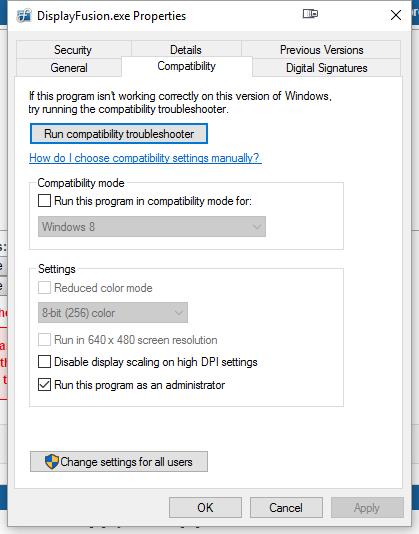
MWSnap001 2016-02-16, 13_42_23.jpg
Thanks! I can see the screenshot. Disabling the "Run as administrator" checkbox on that tab should fix up the startup issue. Windows won't auto-start any program that has "Run as administrator" enabled.
VortexDweller
6 discussion posts
Thank you!!
It's working perfectly now!
I even had another software that wasn't starting up with windows, changed/removed its compatibility, and that too starts up with windows now!
Thank you so much for the prompt, and effective responses!!
I am very glad to have bought this software, and to have sought for solutions on this forum. Super satisfied!
Best wishes for you!
VortexDweller
6 discussion posts
I don't mind at all. Feel free to use my comments as you wish.
Thank you again!

wildman082
4 discussion posts
I just ran in to the same issue with setting the refresh rate. Is using the "Use Classic Get/Set Functions" still the recommended solution for Windows 10? I'm running DisplayFusion Pro 9.1.
I would recommend trying that Advanced Setting still, yep. Make sure to re-create the Monitor Profiles after changing that setting as well.

fenix1
7 discussion posts
Hi - I hope it's OK to jump off this thread.
It seems like the option for "Use Classic Get/Set Functions" is no longer under Advanced Settings. There is an option for "Force Mirroring to use Classic Polling Method" - so I tried changing that, then recreating the monitor profile, but I am still unable to change the refresh rate. Any other workarounds?
Thanks
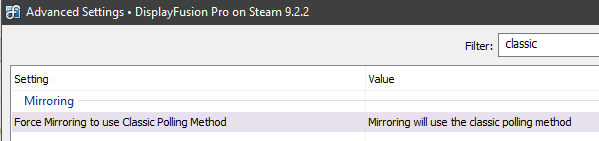
BNF-DF_Setting1.PNG
wildman082
4 discussion posts
fenix1, since upgrading to 9.2.2 the refresh rate hasn't gotten set properly for me when switching profiles and the "Use Classic Get/Set Functions" is no longer under Advanced Settings. I emailed support about this earlier today.
wildman082
4 discussion posts
Thanks for the tip about nircmd. I've used that utility before but I didn't know it could set the resolution/refresh rate like that. Are you also having an issue with setting the refresh rate on a 4K TV? I've been working with support on the issue but no fix yet.
Excellent! Glad to hear it!

François Boyé73781
2 discussion posts
(sorry I posted same reply in a similar thread).
Hello,
just wanted to point out that I've got the same issue using Display Fusion 9.5 Beta 1
(current steam downloaded version also has the same issue)
When changing resolution with DF 9.5b1, Active Resolution Signal is 4k.
Whereas with windows or Nvidia control panel it is Full HD
This issue is blocking when you need to send a FHD signal :
Long HDMI cable length or target device hdmi limitation
Thanks for your help.
I attach a BFCustomer comparaison file with both display settings.
• Attachment [protected]: BFCustomerTest.htm [153,331 bytes]
May 5, 2019 (modified May 5, 2019)
•
#35

Jason Shudrowitz
2 discussion posts
I am also waiting on a fix for this issue please and thank you! I am being forced to leave my 4k tv at only 30 refresh rate when i use dual monitors or just been using 1 monitor waiting for the fix on here it locks you into a clone monitor enabled mode, even when it is not enabled, but if you shut the clone monitor off it sets refresh rate fine, It is a bug in the monitor clone settings imo! please help i am sure there is alot of us!:laugh:
Jun 7, 2019 (modified Jun 11, 2019)
•
#38
@Jason: Could you provide some more details on this? Do you have a monitor that's sometimes enabled and cloned with the TV, and other times disabled?
Jason Shudrowitz
2 discussion posts
Keith,
I went ahead and bought the new Samsung U32R590 monitor and it went right to the correct refresh and 4k rez on both monitors, the problem was when i had my Samsung UN40NU7200 from walmart it is the same as the 7100 just different model numbers for price matching, but if anyone else has there TV locked into the same rez or keep cloning monitor, Which in my case was a 27er HP monitor 1080p, It was just what i needed to drop the $500 on the 2019 Samy, which i cannot beleive how much better there super VA Q-dot technology has gotten, If you guys are in the market for a new display either LG ultrafine or Samy Q-dot VA panels are way better now days, I was a IPS only user for years, but i have done several side by sides comparisons the last couple months and until OLED Monitors figure out its "burn in" issues and they make them more affordable, Its VA panels for me..
Sorry for the rant i am just loving my new display and would of never thought I would see this much improvement in contrast and picture quality as of whole over IPS, SO thank you Keith and Display Fusion I am much happier now the way it all worked out my TV is better of in my garage for the kids to watch...:laugh:
Jun 15, 2019 (modified Jun 15, 2019)
•
#40
No worries, glad to hear that's working well!