
Zerora
2 discussion posts
I recently update my DisplayFusion Pro on Steam to version 12.0.2 on Windows 11 (25H2) [26200.7840].
After the update my icons are suddenly much bigger then before (see attached image). I use a mod in Windhawk to get the default taskbar on top of my screen and to set the icon size of the default taskbar. Before the update the sizes of DF's icons and my preferred icon size set in Windhawk of the default taskbar were roughly the same, but DF's icons size changed after the update. Setting an icon size with 'Taskbar Button Icon Size Override' (found in advanced settings) is not doing a thing.
How to fix this?
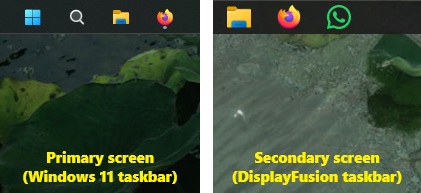
taskbar.jpg
Mar 5, 2026 (modified Mar 5, 2026)
•
#1
If you remove Windhawk and restart DisplayFusion, does the size look correct?
Zerora
2 discussion posts
Disabling the mod for icon size in Windhawk did make the icons of DisplayFusion match with the icon size of the Windows taskbar. And i was able to change the height of the DF taskbar to the same height i wanted to match with my preferred height set up in Windhawk. And this time I was able to change the icon size of the DisplayFusion taskbar this time through the advanced settings. Don't know why it didn't work before, but it's ok now.












