
rupertsland
62 discussion posts
Hi John.
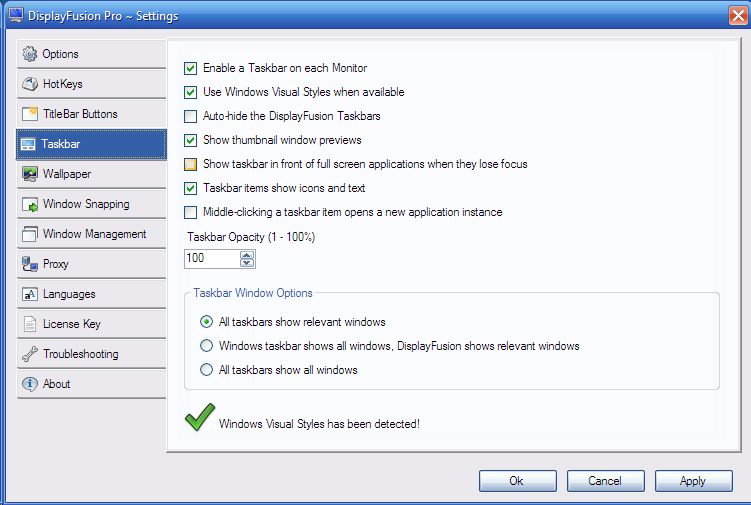
I've used the freeware version of DisplayFusion for a few months and I was hoping to take advantage of thumbnail window previews in the Pro version. So I decided to try the trial version fo DispalyFusion Pro. To my great disappointment, the thumbnail window previews and the opacity settings don't work at all. I can check the those settings and click apply, but nothing happens. What am I doing wrong?
I am using a 1-month trial of DisplayFusion Pro 3.1.5 on my Toshiba Satelite Pro notebook with Windows XP Pro x86 edition with SP3. I have an Intel graphics card (see specs below). I have dual-monitor support, but my notebook does not have a second monitor attached.
Attached is a screenshot of the Settings dialog.
Sincerely,
Rupertsland
Winnipeg, Canada
[size=1]
Intel(R) Graphics Media Accelerator Driver for Mobile Report:
Report Date:10/14/2009
Report Time[hr:mm:ss]:19:28:52
Driver Version:6.14.10.4363
Operating System:Windows XP* Professional, Service Pack 3 (5.1.2600)
Default Language:English
DirectX* Version:9.0
Physical Memory:2038 MB
Minimum Graphics Memory:8 MB
Maximum Graphics Memory:128 MB
Graphics Memory in Use:10 MB
Processor:x86 family 6 Model 13 Stepping 8
Processor Speed:1862 MHZ
Vendor ID:8086
Device ID:2592
Device Revision:03
Adaptor:
Mobile Intel 915GM/GMS, 910GML Express Chipset Family
DAC type: internal
Memory: 128 MB
[/size]
Settings.jpg
Sorry, but unfortunately the taskbar settings only apply to the DisplayFusion taskbars (on secondary monitors), not the Windows taskbar.
rupertsland
62 discussion posts
Hi Jon.
Thank you for the reply. In the meantime, I found a freeware app that displays thumbnail images.
Cheers,
Rupertsland


