Home  •  DisplayFusion Online  •  Support  •  View this site in English 以简体中文浏览此网站 以正體中文瀏覽此網站
  •  
Binary Fortress Software WallpaperFusion LogFusion ClipboardFusion FileSeek Notepad Replacer
DisplayFusion: Multiple Monitors Made Easy!
 

DisplayFusion 4.0 Now Available!

Return to News
May 2, 2012

We're very happy to announce that DisplayFusion 4.0 is now available for download!


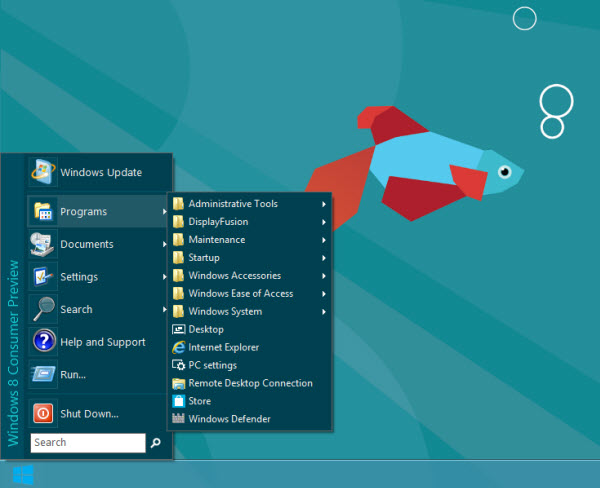
This version includes a bunch of great new features. Taskbars now include tray icons, and an optional, alternate Classic style Start Menu. The alternate Start Menu is a great option for anyone who wants Start Menu functionality in Windows 8. Google Image Search, Bing Image Search, and deviantART have been added to the Online Wallpaper Providers. Desktop Icon Profiles allow you to save and restore your favourite Desktop icon layouts. Aero Colour Settings allow DisplayFusion to set the Aero Colour based on either the dominant colour of the current wallpaper, or the current application's icon (Windows 7 and Windows 8 only).


Here are the most notable changes for DisplayFusion 4.0:


  • Windows 8 Consumer Preview Support
  • Optional alternate Start Menu for DisplayFusion Taskbars
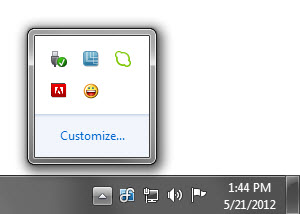
  • DisplayFusion Taskbars now contain tray icons
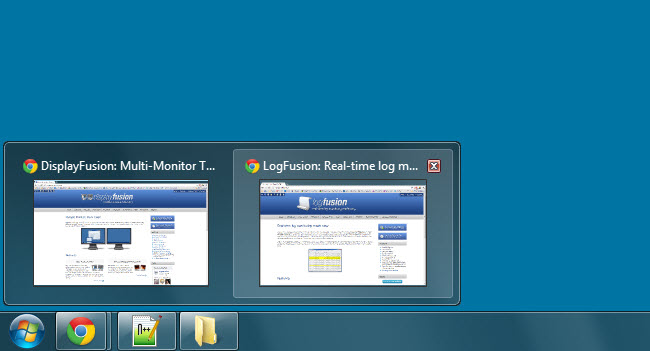
  • DisplayFusion Taskbars now use basic Jump Lists when right-clicking Taskbar buttons
  • HotKeys can be run from the basic Jump Lists on the DisplayFusion Taskbars
  • Added Google Image Search, Bing Image Search, and deviantART to Online Wallpaper Providers
  • Desktop Icon Profiles
  • Aero Colour can now be set by DisplayFusion based on the current wallpaper or current application
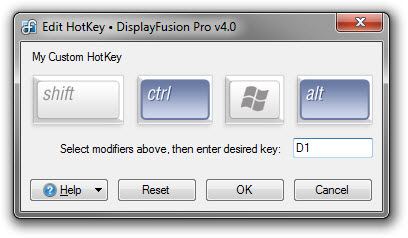
  • HotKey editor now has a window picker for easier setup of custom HotKeys
  • Added a basic built-in DisplayFusion Photos Screen Saver
  • Revamped silent installer allowing for better customization of silent deployments (new requirements for deploying via Group Policy)
  • ADMX Group Policy templates for centralized control in Active Directory environments
  • UI now properly supports right-to-left languages
  • 23 languages bundled
  • New DisplayFusion logo and icon
  • Tons of bug fixes and performance/stability improvements

We're still hoping to finish up the translations for Catalan, Finnish, Galician, Japanese, Latvian, Norwegian, Slovak, and Slovenian. If you're interested in helping out with the translations, please contact us.


We encourage everyone to update to this new version today to take advantage of these improvements. If you've already purchased DisplayFusion, it's a lifetime license, so you can upgrade to this version at no cost! If you would like to see a complete list of all the changes, please visit the DisplayFusion Change Log. We'd like to send out a big thanks to the dozens of people who helped with the DisplayFusion translations, and the thousands of people that helped test the Beta versions. Thanks everyone!


And now, on to some screenshots from DisplayFusion 4.0:
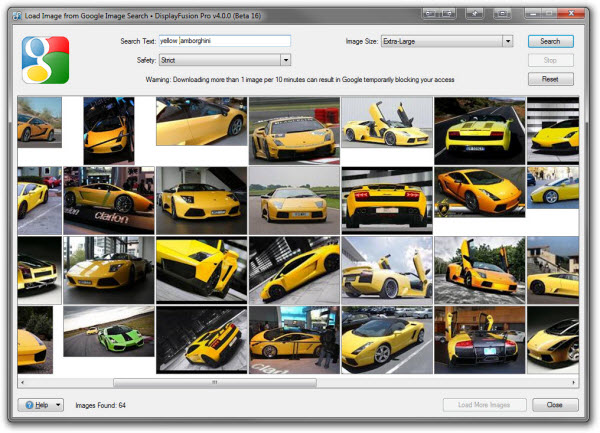

Wallpaper Provider: Google Image Search


Taskbar Tray Icons
Taskbar Tray Icons


Taskbar Alternate Start Menu


Key Assignment for HotKeys


DisplayFusion Taskbar Previews

Comments

Avatar from Gravatar.com
brian carr says:
fantastic program for multi monitors and great new features in DisplayFusion 4.0 well done !
May 2, 2012
Avatar from Gravatar.com
Dustin W says:
Wow, thanks for the HUGE feature release. I especially am enjoying the bug fixes and the option to hide the tray icon under advanced options.
May 2, 2012
Avatar from Gravatar.com
Mark says:
Great update from a great company, long may they continue to provide us with a quality product, thanks guys.
May 2, 2012
Avatar from Gravatar.com
Bogdan says:
Hello,
I would like to know if it's possible to setup 2 different time zones clock with DisplayFusion on a dual-monitor system (Windows 7 32bit). I would like to setup an Eastern Time Zone clock on one monitor and a different Time Zone on the other monitor.
Please let me know if this is duable.
Thanks,
Bogdan
May 3, 2012
Avatar from Gravatar.com
Keith Lammers says:
Thanks for the compliments guys!

@Bogdan: It's not currently possible, but I've added it to our feature request list for future investigation.
May 3, 2012
Avatar from Gravatar.com
PedroStephano says:
Great idea @Bogdan for two time zones - please may I second that? Thanks @Keith.
I updated as soon as I heard and must say that I like it a lot. It seems faster I think?
May 3, 2012
Avatar from Gravatar.com
Keith Lammers says:
@PedroStephano: I've added your vote as well.

Thanks!
May 4, 2012
Avatar from Gravatar.com
Kai Virkki says:
Hi!

Thanks for a great product! Is it possible to hide the tray icons from the taskbar of the second monitor? For me, it's enough to see tray icons on the primary monitor and they just take space from the application tabs in the second task bar.
May 7, 2012
Avatar from Gravatar.com
Keith Lammers says:
@Kai: You certainly can! Just right-click the taskbar and navigate to Multi-Monitor Taskbar System Tray Show/Hide Icons.
May 7, 2012
Avatar from Gravatar.com
Keith Lammers says:
@Bogdan and @PedroStephano: We've just released 4.0.1 Beta 1, which now includes an Advanced Setting to change the time zone for the DisplayFusion Taskbar's clock. More info here: http://www.displayfusion.com/AdvancedSettings/#taskbar-clocktimezone
May 7, 2012
This news post is closed for commenting.