
Kevin Chea
1 discussion post
Just wondering if there is a way to have DF automatically load a desktop icons profile on startup. I currently have all of my icons on my secondary monitor, but every time I reboot my system, they move back to my primary monitor. I'd like to stop this from happening. I'm also open to other solutions.

Philipp 8.1
6 discussion posts
Hi Keith,
I understand your reply to this question is a few years old, so a lot has changed with Display Fusion. Yet I'm trying to archive more or less the same thing, unfortunately without success; I tried to follow the steps mentioned by you, but I don't see a drop-down button in said window to chose my Icons Profile. I have the latest version 7.1 Pro, so I guess this might simply have changed since the version you are referring to.
My setup is: A Notebook and two additional monitors, all three at the same resolution (full-hd). Most of the times, I use it like this, only sometimes I unplug the notebook and use it without the additional displays. The two additional monitors are attached via an "i-tec usb 3.0 docking station" which has its own graphics adapter, so the problem might be due to this maybe? Because, the thing is: Whenever Display Fusion starts, I have to manually select the correct Icons Profile (via: right-click on tray symbol > "desktop icons (profiles)" > load profile; I run Display Fusion in German, so the actual menu items might be named a little bit different than stated here, sorry for that). This is necessary both when I have my Notebook unplugged or when I have the additional two displays attached -- in neither situation a correct profile is loaded. I'm running Windows 8.1 64 bit,
Is there something I can do to have Display Fusion load the correct profile at start-up? Of course, it's just an annoyance and not a real bug or problem, but yet I'd be happier not having to manually select the right profile every time at start-up :-)
Best regards,
Philipp
Those instructions are still valid :)
Please see the attached screenshot for reference. Let me know if you still run into any trouble at all!
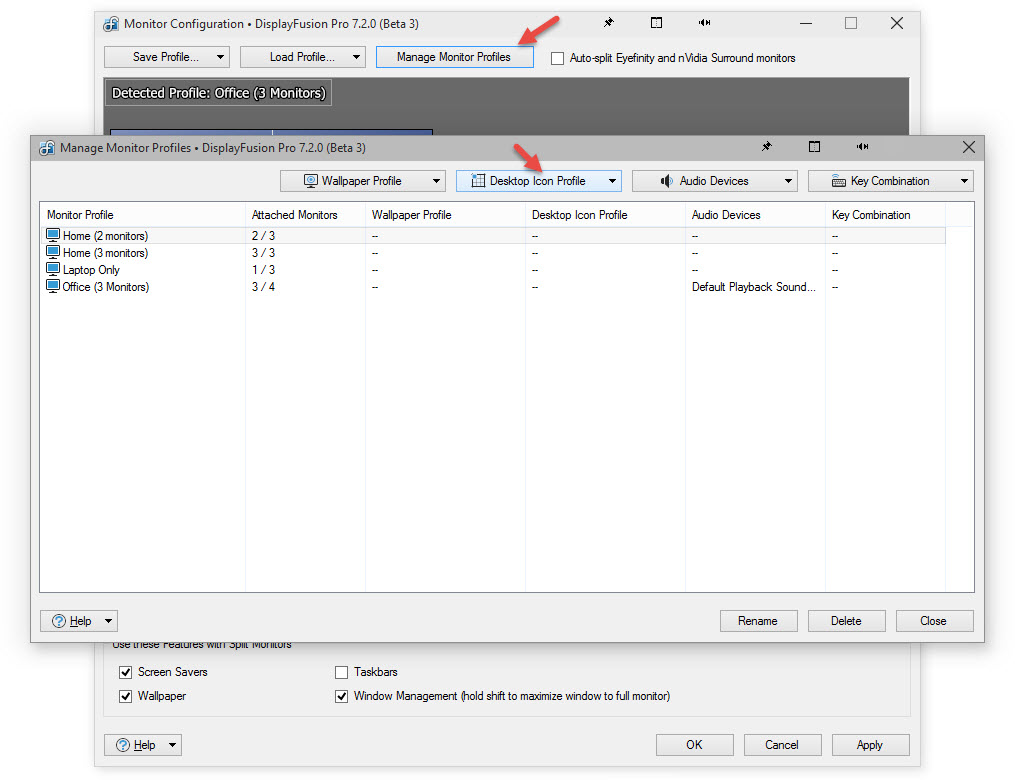
MonitorConfigDesktopIcons.jpg
No problem, glad to hear it!

Wouter12
2 discussion posts
I use also the desktop icon profile for my 3 monitors.
This works great to have a fixed desktop icon profile but every time I add a desktop icon all icons will move to display 1.
To get the old situation back I have to load the default profile again.
How can I prevent this?
The icons just automatically move as soon as a new desktop icon is created? Do you have auto-arrange enabled? (right-click the desktop > View > Auto Arrange)
Wouter12
2 discussion posts
Yes your great that was the problem, thanks for respons and so fast awesome!
No worries, glad I could help!




 Thanks again! Best regards, Ph.








